Articles related with Mikrotik hotspot such as :
HotSpot Gateway Documentation
Manual:IP/Hotspot
http://www.settingmikrotik.com/
Step by Step Setup Hotspot dengan Halaman Login di Mikrotik Router OS
Konfigurasi Hotspot Mikrotik
How to Setup Your Own Hotspot with MIKROTIK routers
Mikrotik Hotspot dan User Manager
Cara hack hotspot mikrotik
Mikrotik Hotspot Hacking
Setting Radius dan hotspot Mikrotik

Showing posts with label mikrotik. Show all posts
Showing posts with label mikrotik. Show all posts
14 May 2011

10 May 2011
The Meaning of MikroTik Log Messages on Linux Server
This is example of log messages from MikroTik. I am trying to understand the causes of these logs and the rule where the Mikrotik that produce it. I tried to group them in the same time sequence.
May 9 23:43:46 183.91.67.2 KPB Unknown(81) = 00-00-00-42-50-41-2D-41-47-2D-50-43
May 9 23:43:46 183.91.67.2 KPB Class-Id = "MSFT 5.0"
May 9 23:43:46 183.91.67.2 KPB Parameter-List = Subnet-Mask,Domain-Name,Router,Domain-Server,NETBIOS-Name-Server,Unknown(46),Unknown(47),Unknown(31),Static-Route,Classless-Route,Unknown(249),Vendor-Specific
May 9 23:43:46 KPB dhcp_bsdm sending ack with id 1548336385 to 255.255.255.255
May 9 23:43:46 183.91.67.2 KPB flags = broadcast
May 9 23:43:46 183.91.67.2 KPB ciaddr = 0.0.0.0
May 9 23:43:46 183.91.67.2 KPB yiaddr = 192.168.2.85
May 9 23:43:46 183.91.67.2 KPB siaddr = 192.168.2.1
May 9 23:43:46 183.91.67.2 KPB chaddr = 00:15:F2:82:D9:39
May 9 23:43:46 183.91.67.2 KPB Msg-Type = ack
May 9 23:43:46 183.91.67.2 KPB Server-Id = 192.168.2.1
May 9 23:43:46 183.91.67.2 KPB Address-Time = 31536000
May 9 23:43:46 183.91.67.2 KPB Subnet-Mask = 255.255.255.0
May 9 23:43:46 183.91.67.2 KPB Router = 192.168.2.1
May 9 23:43:46 183.91.67.2 KPB Domain-Server = 202.152.5.36,202.152.0.2
May 9 23:58:08 KPB dhcp_bu received inform with id 420795606 from 192.168.1.246
May 9 23:58:08 183.91.67.2 KPB Msg-Type = inform
May 9 23:58:08 183.91.67.2 KPB Client-Id = 01-00-50-8D-9F-48-F9
May 9 23:58:08 183.91.67.2 KPB Host-Name = "Windows7-PC"
May 9 23:58:08 183.91.67.2 KPB Class-Id = "MSFT 5.0"
May 9 23:58:08 183.91.67.2 KPB Parameter-List = Subnet-Mask,Domain-Name,Router,Domain-Server,NETBIOS-Name-Server,Unknown(46),Unknown(47),Unknown(31),Static-Route,Classless-Route,Unknown(249),Vendor-Specific,Unknown(252)
May 9 23:58:08 KPB dhcp_bu sending ack with id 420795606 to 255.255.255.255
May 9 23:58:08 183.91.67.2 KPB flags = broadcast
May 9 23:58:08 183.91.67.2 KPB ciaddr = 192.168.1.246
May 9 23:58:08 183.91.67.2 KPB siaddr = 192.168.1.129
May 9 23:58:08 183.91.67.2 KPB chaddr = 00:50:8D:9F:48:F9
May 9 23:58:08 183.91.67.2 KPB Msg-Type = ack
May 9 23:58:08 183.91.67.2 KPB Server-Id = 192.168.1.129
May 9 23:58:08 183.91.67.2 KPB Subnet-Mask = 255.255.255.128
May 9 23:58:08 183.91.67.2 KPB Router = 192.168.1.129
May 9 23:58:08 183.91.67.2 KPB Domain-Server = 202.152.5.36,202.152.0.2
May 10 00:14:15 183.91.67.2 KPB Subnet-Mask = 255.255.255.0
May 10 00:14:15 183.91.67.2 KPB Router = 192.168.2.1
May 10 00:14:15 183.91.67.2 KPB Domain-Server = 202.152.5.36,202.152.0.2
May 10 00:18:50 KPB dhcp_bsdm received request with id 2652037990 from 0.0.0.0
May 10 00:18:50 183.91.67.2 KPB flags = broadcast
May 10 00:18:50 183.91.67.2 KPB ciaddr = 0.0.0.0
May 10 00:18:50 183.91.67.2 KPB chaddr = 00:15:F2:82:D9:39
May 10 00:18:50 183.91.67.2 KPB Msg-Type = request
May 10 00:18:50 183.91.67.2 KPB Client-Id = 01-00-15-F2-82-D9-39
May 10 00:18:50 183.91.67.2 KPB Address-Request = 192.168.2.85
May 10 00:18:50 183.91.67.2 KPB Host-Name = "BPA-AG-PC"
May 10 00:18:50 183.91.67.2 KPB Unknown(81) = 00-00-00-42-50-41-2D-41-47-2D-50-43
May 10 00:18:50 183.91.67.2 KPB Class-Id = "MSFT 5.0"
May 10 00:18:50 183.91.67.2 KPB Parameter-List = Subnet-Mask,Domain-Name,Router,Domain-Server,NETBIOS-Name-Server,Unknown(46),Unknown(47),Unknown(31),Static-Route,Classless-Route,Unknown(249),Vendor-Specific
May 10 00:18:50 KPB dhcp_bsdm sending ack with id 2652037990 to 255.255.255.255
May 10 00:18:50 183.91.67.2 KPB flags = broadcast
May 10 00:18:50 183.91.67.2 KPB ciaddr = 0.0.0.0
May 10 00:18:50 183.91.67.2 KPB yiaddr = 192.168.2.85
May 10 00:18:50 183.91.67.2 KPB siaddr = 192.168.2.1
May 10 00:18:50 183.91.67.2 KPB chaddr = 00:15:F2:82:D9:39
May 10 00:18:50 183.91.67.2 KPB Msg-Type = ack
May 10 00:18:50 183.91.67.2 KPB Server-Id = 192.168.2.1
May 10 00:18:50 183.91.67.2 KPB Address-Time = 31536000
May 10 00:18:50 183.91.67.2 KPB Subnet-Mask = 255.255.255.0
May 10 00:18:50 183.91.67.2 KPB Router = 192.168.2.1
May 10 00:18:50 183.91.67.2 KPB Domain-Server = 202.152.5.36,202.152.0.2
May 10 00:31:37 183.91.67.2 KPB Subnet-Mask = 255.255.255.0
May 10 00:31:37 183.91.67.2 KPB Router = 192.168.2.1
May 10 00:31:37 183.91.67.2 KPB Domain-Server = 202.152.5.36,202.152.0.2
May 10 00:31:48 KPB dhcp_bsdm received request with id 3594588014 from 0.0.0.0
May 10 00:31:48 183.91.67.2 KPB flags = broadcast
May 10 00:31:48 183.91.67.2 KPB ciaddr = 0.0.0.0
May 10 00:31:48 183.91.67.2 KPB chaddr = 00:15:F2:82:D9:39
May 10 00:31:48 183.91.67.2 KPB Msg-Type = request
May 10 00:31:48 183.91.67.2 KPB Client-Id = 01-00-15-F2-82-D9-39
May 10 00:31:48 183.91.67.2 KPB Address-Request = 192.168.2.85
May 10 00:31:48 183.91.67.2 KPB Host-Name = "BPA-AG-PC"
May 10 00:31:48 183.91.67.2 KPB Unknown(81) = 00-00-00-42-50-41-2D-41-47-2D-50-43
May 10 00:31:48 183.91.67.2 KPB Class-Id = "MSFT 5.0"
May 10 00:31:48 183.91.67.2 KPB Parameter-List = Subnet-Mask,Domain-Name,Router,Domain-Server,NETBIOS-Name-Server,Unknown(46),Unknown(47),Unknown(31),Static-Route,Classless-Route,Unknown(249),Vendor-Specific
May 10 00:31:48 KPB dhcp_bsdm sending ack with id 3594588014 to 255.255.255.255
May 10 00:31:48 183.91.67.2 KPB flags = broadcast
May 10 00:31:48 183.91.67.2 KPB ciaddr = 0.0.0.0
May 10 00:31:48 183.91.67.2 KPB yiaddr = 192.168.2.85
May 10 00:31:48 183.91.67.2 KPB siaddr = 192.168.2.1
May 10 00:31:48 183.91.67.2 KPB chaddr = 00:15:F2:82:D9:39
May 10 00:31:48 183.91.67.2 KPB Msg-Type = ack
May 10 00:31:48 183.91.67.2 KPB Server-Id = 192.168.2.1
May 10 00:31:48 183.91.67.2 KPB Address-Time = 31536000
May 10 00:31:48 183.91.67.2 KPB Subnet-Mask = 255.255.255.0
May 10 00:31:48 183.91.67.2 KPB Router = 192.168.2.1
May 10 00:31:48 183.91.67.2 KPB Domain-Server = 202.152.5.36,202.152.0.2
May 10 01:24:12 183.91.67.2 KPB Server-Id = 192.168.1.129
May 10 01:24:12 183.91.67.2 KPB Subnet-Mask = 255.255.255.128
May 10 01:24:12 183.91.67.2 KPB Router = 192.168.1.129
May 10 01:24:12 183.91.67.2 KPB Domain-Server = 202.152.5.36,202.152.0.2
May 10 02:11:24 183.91.67.2 KPB Subnet-Mask = 255.255.255.0
May 10 02:11:24 183.91.67.2 KPB Router = 192.168.2.1
May 10 02:11:24 183.91.67.2 KPB Domain-Server = 202.152.5.36,202.152.0.2
May 10 02:50:02 SRP HotSpot_Gd71: new host detected 00:14:D1:F1:16:8B/192.168.1.19 by UDP :1026 -> 202.169.224.16:123
May 10 02:55:02 SRP HotSpot_Gd71: dynamic host 172.16.1.114 removed: idle timeout
May 10 03:00:31 183.91.67.2 KPB Subnet-Mask = 255.255.255.128
May 10 03:00:31 183.91.67.2 KPB Router = 192.168.1.129
May 10 03:00:31 183.91.67.2 KPB Domain-Server = 202.152.5.36,202.152.0.2
May 10 03:21:38 183.91.67.2 KPB Address-Time = 31536000
May 10 03:21:38 183.91.67.2 KPB Subnet-Mask = 255.255.255.0
May 10 03:21:38 183.91.67.2 KPB Router = 192.168.2.1
May 10 03:21:38 183.91.67.2 KPB Domain-Server = 202.152.5.36,202.152.0.2
May 10 03:49:08 KPB user admin logged in from 110.137.227.147 via winbox
May 10 03:51:12 KPB log rule changed by admin
May 10 03:51:18 KPB log rule changed by admin
May 10 03:51:23 KPB log rule changed by admin
From http://whois.domaintools.com/, I find :
202.152.5.36 = ns.idola.net.id
202.152.0.2 = rajawali.idola.net.id
For last 100 lines :
#tail -100 /var/log/mikrotik.log
For real time :
#tail -f /var/log/mikrotik.log
Tested : event, info, system and warning
I tried to disable log rule or under testing : critical, dhcp, error
Enable log rule : hotspot.
May 9 23:43:46 183.91.67.2 KPB Unknown(81) = 00-00-00-42-50-41-2D-41-47-2D-50-43
May 9 23:43:46 183.91.67.2 KPB Class-Id = "MSFT 5.0"
May 9 23:43:46 183.91.67.2 KPB Parameter-List = Subnet-Mask,Domain-Name,Router,Domain-Server,NETBIOS-Name-Server,Unknown(46),Unknown(47),Unknown(31),Static-Route,Classless-Route,Unknown(249),Vendor-Specific
May 9 23:43:46 KPB dhcp_bsdm sending ack with id 1548336385 to 255.255.255.255
May 9 23:43:46 183.91.67.2 KPB flags = broadcast
May 9 23:43:46 183.91.67.2 KPB ciaddr = 0.0.0.0
May 9 23:43:46 183.91.67.2 KPB yiaddr = 192.168.2.85
May 9 23:43:46 183.91.67.2 KPB siaddr = 192.168.2.1
May 9 23:43:46 183.91.67.2 KPB chaddr = 00:15:F2:82:D9:39
May 9 23:43:46 183.91.67.2 KPB Msg-Type = ack
May 9 23:43:46 183.91.67.2 KPB Server-Id = 192.168.2.1
May 9 23:43:46 183.91.67.2 KPB Address-Time = 31536000
May 9 23:43:46 183.91.67.2 KPB Subnet-Mask = 255.255.255.0
May 9 23:43:46 183.91.67.2 KPB Router = 192.168.2.1
May 9 23:43:46 183.91.67.2 KPB Domain-Server = 202.152.5.36,202.152.0.2
May 9 23:58:08 KPB dhcp_bu received inform with id 420795606 from 192.168.1.246
May 9 23:58:08 183.91.67.2 KPB Msg-Type = inform
May 9 23:58:08 183.91.67.2 KPB Client-Id = 01-00-50-8D-9F-48-F9
May 9 23:58:08 183.91.67.2 KPB Host-Name = "Windows7-PC"
May 9 23:58:08 183.91.67.2 KPB Class-Id = "MSFT 5.0"
May 9 23:58:08 183.91.67.2 KPB Parameter-List = Subnet-Mask,Domain-Name,Router,Domain-Server,NETBIOS-Name-Server,Unknown(46),Unknown(47),Unknown(31),Static-Route,Classless-Route,Unknown(249),Vendor-Specific,Unknown(252)
May 9 23:58:08 KPB dhcp_bu sending ack with id 420795606 to 255.255.255.255
May 9 23:58:08 183.91.67.2 KPB flags = broadcast
May 9 23:58:08 183.91.67.2 KPB ciaddr = 192.168.1.246
May 9 23:58:08 183.91.67.2 KPB siaddr = 192.168.1.129
May 9 23:58:08 183.91.67.2 KPB chaddr = 00:50:8D:9F:48:F9
May 9 23:58:08 183.91.67.2 KPB Msg-Type = ack
May 9 23:58:08 183.91.67.2 KPB Server-Id = 192.168.1.129
May 9 23:58:08 183.91.67.2 KPB Subnet-Mask = 255.255.255.128
May 9 23:58:08 183.91.67.2 KPB Router = 192.168.1.129
May 9 23:58:08 183.91.67.2 KPB Domain-Server = 202.152.5.36,202.152.0.2
May 10 00:14:15 183.91.67.2 KPB Subnet-Mask = 255.255.255.0
May 10 00:14:15 183.91.67.2 KPB Router = 192.168.2.1
May 10 00:14:15 183.91.67.2 KPB Domain-Server = 202.152.5.36,202.152.0.2
May 10 00:18:50 KPB dhcp_bsdm received request with id 2652037990 from 0.0.0.0
May 10 00:18:50 183.91.67.2 KPB flags = broadcast
May 10 00:18:50 183.91.67.2 KPB ciaddr = 0.0.0.0
May 10 00:18:50 183.91.67.2 KPB chaddr = 00:15:F2:82:D9:39
May 10 00:18:50 183.91.67.2 KPB Msg-Type = request
May 10 00:18:50 183.91.67.2 KPB Client-Id = 01-00-15-F2-82-D9-39
May 10 00:18:50 183.91.67.2 KPB Address-Request = 192.168.2.85
May 10 00:18:50 183.91.67.2 KPB Host-Name = "BPA-AG-PC"
May 10 00:18:50 183.91.67.2 KPB Unknown(81) = 00-00-00-42-50-41-2D-41-47-2D-50-43
May 10 00:18:50 183.91.67.2 KPB Class-Id = "MSFT 5.0"
May 10 00:18:50 183.91.67.2 KPB Parameter-List = Subnet-Mask,Domain-Name,Router,Domain-Server,NETBIOS-Name-Server,Unknown(46),Unknown(47),Unknown(31),Static-Route,Classless-Route,Unknown(249),Vendor-Specific
May 10 00:18:50 KPB dhcp_bsdm sending ack with id 2652037990 to 255.255.255.255
May 10 00:18:50 183.91.67.2 KPB flags = broadcast
May 10 00:18:50 183.91.67.2 KPB ciaddr = 0.0.0.0
May 10 00:18:50 183.91.67.2 KPB yiaddr = 192.168.2.85
May 10 00:18:50 183.91.67.2 KPB siaddr = 192.168.2.1
May 10 00:18:50 183.91.67.2 KPB chaddr = 00:15:F2:82:D9:39
May 10 00:18:50 183.91.67.2 KPB Msg-Type = ack
May 10 00:18:50 183.91.67.2 KPB Server-Id = 192.168.2.1
May 10 00:18:50 183.91.67.2 KPB Address-Time = 31536000
May 10 00:18:50 183.91.67.2 KPB Subnet-Mask = 255.255.255.0
May 10 00:18:50 183.91.67.2 KPB Router = 192.168.2.1
May 10 00:18:50 183.91.67.2 KPB Domain-Server = 202.152.5.36,202.152.0.2
May 10 00:31:37 183.91.67.2 KPB Subnet-Mask = 255.255.255.0
May 10 00:31:37 183.91.67.2 KPB Router = 192.168.2.1
May 10 00:31:37 183.91.67.2 KPB Domain-Server = 202.152.5.36,202.152.0.2
May 10 00:31:48 KPB dhcp_bsdm received request with id 3594588014 from 0.0.0.0
May 10 00:31:48 183.91.67.2 KPB flags = broadcast
May 10 00:31:48 183.91.67.2 KPB ciaddr = 0.0.0.0
May 10 00:31:48 183.91.67.2 KPB chaddr = 00:15:F2:82:D9:39
May 10 00:31:48 183.91.67.2 KPB Msg-Type = request
May 10 00:31:48 183.91.67.2 KPB Client-Id = 01-00-15-F2-82-D9-39
May 10 00:31:48 183.91.67.2 KPB Address-Request = 192.168.2.85
May 10 00:31:48 183.91.67.2 KPB Host-Name = "BPA-AG-PC"
May 10 00:31:48 183.91.67.2 KPB Unknown(81) = 00-00-00-42-50-41-2D-41-47-2D-50-43
May 10 00:31:48 183.91.67.2 KPB Class-Id = "MSFT 5.0"
May 10 00:31:48 183.91.67.2 KPB Parameter-List = Subnet-Mask,Domain-Name,Router,Domain-Server,NETBIOS-Name-Server,Unknown(46),Unknown(47),Unknown(31),Static-Route,Classless-Route,Unknown(249),Vendor-Specific
May 10 00:31:48 KPB dhcp_bsdm sending ack with id 3594588014 to 255.255.255.255
May 10 00:31:48 183.91.67.2 KPB flags = broadcast
May 10 00:31:48 183.91.67.2 KPB ciaddr = 0.0.0.0
May 10 00:31:48 183.91.67.2 KPB yiaddr = 192.168.2.85
May 10 00:31:48 183.91.67.2 KPB siaddr = 192.168.2.1
May 10 00:31:48 183.91.67.2 KPB chaddr = 00:15:F2:82:D9:39
May 10 00:31:48 183.91.67.2 KPB Msg-Type = ack
May 10 00:31:48 183.91.67.2 KPB Server-Id = 192.168.2.1
May 10 00:31:48 183.91.67.2 KPB Address-Time = 31536000
May 10 00:31:48 183.91.67.2 KPB Subnet-Mask = 255.255.255.0
May 10 00:31:48 183.91.67.2 KPB Router = 192.168.2.1
May 10 00:31:48 183.91.67.2 KPB Domain-Server = 202.152.5.36,202.152.0.2
May 10 01:24:12 183.91.67.2 KPB Server-Id = 192.168.1.129
May 10 01:24:12 183.91.67.2 KPB Subnet-Mask = 255.255.255.128
May 10 01:24:12 183.91.67.2 KPB Router = 192.168.1.129
May 10 01:24:12 183.91.67.2 KPB Domain-Server = 202.152.5.36,202.152.0.2
May 10 02:11:24 183.91.67.2 KPB Subnet-Mask = 255.255.255.0
May 10 02:11:24 183.91.67.2 KPB Router = 192.168.2.1
May 10 02:11:24 183.91.67.2 KPB Domain-Server = 202.152.5.36,202.152.0.2
May 10 02:50:02 SRP HotSpot_Gd71: new host detected 00:14:D1:F1:16:8B/192.168.1.19 by UDP :1026 -> 202.169.224.16:123
May 10 02:55:02 SRP HotSpot_Gd71: dynamic host 172.16.1.114 removed: idle timeout
May 10 03:00:31 183.91.67.2 KPB Subnet-Mask = 255.255.255.128
May 10 03:00:31 183.91.67.2 KPB Router = 192.168.1.129
May 10 03:00:31 183.91.67.2 KPB Domain-Server = 202.152.5.36,202.152.0.2
May 10 03:21:38 183.91.67.2 KPB Address-Time = 31536000
May 10 03:21:38 183.91.67.2 KPB Subnet-Mask = 255.255.255.0
May 10 03:21:38 183.91.67.2 KPB Router = 192.168.2.1
May 10 03:21:38 183.91.67.2 KPB Domain-Server = 202.152.5.36,202.152.0.2
May 10 03:49:08 KPB user admin logged in from 110.137.227.147 via winbox
May 10 03:51:12 KPB log rule changed by admin
May 10 03:51:18 KPB log rule changed by admin
May 10 03:51:23 KPB log rule changed by admin
From http://whois.domaintools.com/, I find :
202.152.5.36 = ns.idola.net.id
202.152.0.2 = rajawali.idola.net.id
For last 100 lines :
#tail -100 /var/log/mikrotik.log
For real time :
#tail -f /var/log/mikrotik.log
Tested : event, info, system and warning
I tried to disable log rule or under testing : critical, dhcp, error
Enable log rule : hotspot.
07 May 2011
Send Logs MikroTik with Private IP to Linux Server
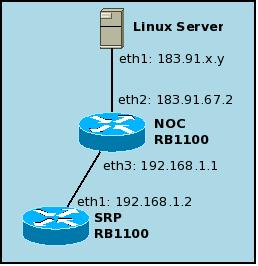 Basically, MikroTik with Private IP can send log to Linux Server. With condition, this MikroTik with Private IP, has uplink to another MikroTik with Public IP. Suppose MikroTik RB1100 with Private IP was called SRP and has IP 192.168.1.2. Suppose MikroTik RB1100 with Public IP was called NOC and has IP 183.91.x1.y1. Because IP 183.91.x1.y1 already be set in the file /etc/rsyslog.conf, then on the linux server side does not need to apply the settings again. You just need setting up on the MikroTik SRP.
On Linux Server, lets /etc/rsyslog.conf file like this
### for mikrotik remote logging
$AllowedSender UDP, 183.91.x1.y1/255.255.255.255
$AllowedSender TCP, 183.91.x1.y1/255.255.255.255
$UDPSenverAddress 183.91.x1.y1
$UDPSenverRun 514
:fromhost-ip, isequal, "183.91.x1.y1" /var/log/mikrotik.log
& ~
On MikroTik SRP
1. Set action from /system logging menu
Name: lognhc
Type: remote
Remote Address: 183.91.x2.y2 (nhc server)
Remote Port: 514
BSD Syslog: enable
Syslog Facility: 3 (daemon)
2. Set Log Rules from /system logging menu
Topics: system
Prefix:
Action: lognhc
Other topics : critical, dhcp, error, event, hotspot, info, system, warning
Already configured: KPB, SRP.
Check the result:

Send Logs MikroTik to Linux Server
 To send remote logging from a MikroTik device to a Linux Server, you must configure on both sides. Its setting itself is very simple but quite confusing for some people. Lets read carefully. I use MikroTik RB1000, RB1100 and RB450G. All kind of these MikroTik like same way to setting.
On Linux Server
[root@nhc ~]# uname -a
Linux nhc.batan.go.id 2.6.25-14.fc9.i686 #1 SMP Thu May 1 06:28:41 EDT 2008 i686 i686 i386 GNU/Linux
[root@nhc ~]# yum install rsyslog
[root@nhc ~]# /etc/rc.d/init.d/rsyslog restart
[root@nhc ~]# mcedit /etc/rsyslog.conf
------------------------------------------------
# Provides UDP syslog reception
# unremark 2 lines below by MSM, 7 May 2011
$ModLoad imudp.so
$UDPServerRun 514
### for mikrotik remote logging
$AllowedSender UDP, 183.91.67.2/255.255.255.255
$AllowedSender TCP, 183.91.67.2/255.255.255.255
$UDPSenverAddress 183.91.67.2
$UDPSenverRun 514
:fromhost-ip, isequal, "183.91.67.2" /var/log/mikrotik.log
& ~
------------------------------------------------
Restart rsyslog daemon :
[root@nhc ~]# /etc/rc.d/init.d/rsyslog restart
On MikroTik
1. Set action from /system logging menu
 Name: lognhc
Type: remote
Remote Address: 183.91.70.165 (nhc server)
Remote Port: 514
BSD Syslog: enable
Syslog Facility: 3 (daemon)
2. Set Log Rules from /system logging menu
 Topics: system
Prefix:
Action: lognhc
Other topics : critical, dhcp, error, event, hotspot, info, system, warning
Checking the results:
[root@nhc ~]# tail /var/log/mikrotik.log
May 7 13:36:43 NOC user admin logged out from 125.166.204.156 via winbox
May 7 13:37:00 NOC user admin logged in from 125.166.204.156 via winbox
May 7 13:46:54 NOC user admin logged out from 125.166.204.156 via winbox
To add another mikrotik device
To add more mikrotik devices, just add this command or syntax below to /etc/rsyslog.conf file.
### for cipanas mikrotik remote logging
$AllowedSender UDP, 110.136.158.148/255.255.255.255
$AllowedSender TCP, 110.136.158.148/255.255.255.255
$UDPSenverAddress 110.136.158.148
$UDPSenverRun 514
:fromhost-ip, isequal, "110.136.158.148" /var/log/mikrotik.log
& ~
Don't forget to
1. Restart daemon on Linux Server
[root@nhc ~]# /etc/rc.d/init.d/rsyslog restart
2. Add Action on Mikrotik /system logging (see sample above)
3. Add Log Rules on Mikrotik /system logging (see sample above)
4. Checking the results
[root@nhc ~]# tail /var/log/mikrotik.log
May 7 13:36:43 NOC user admin logged out from 125.166.204.156 via winbox
May 7 13:37:00 NOC user admin logged in from 125.166.204.156 via winbox
May 7 13:46:54 NOC user admin logged out from 125.166.204.156 via winbox
May 7 15:09:11 Cipanas user admin logged in from 125.166.204.156 via winbox
See :
http://handz106.multiply.com/journal/item/83/Mikrotik_remote_logging_and_rsyslog
Next Problem :
How to send logs from MikroTik with Private IP
Send Log From MikroTik with Private IP
MikroTik with Private IP has uplink to MikroTik with Public IP. Suppose MikroTik with Private IP is SRP. And suppose MikroTik with Public IP is NOC. SRP has IP 192.168.1.2. NOC has IP 183.91.67.2. Because IP 183.91.67.2 already be set in the file /etc/rsyslog.conf, then on the linux server side does not need to apply the settings again. You just need setting up on the MikroTik SRP.
On Linux Server, /etc/rsyslog.conf file
### for mikrotik remote logging
$AllowedSender UDP, 183.91.67.2/255.255.255.255
$AllowedSender TCP, 183.91.67.2/255.255.255.255
$UDPSenverAddress 183.91.67.2
$UDPSenverRun 514
:fromhost-ip, isequal, "183.91.67.2" /var/log/mikrotik.log
& ~
On MikroTik SRP
1. Set action from /system logging menu
Name: lognhc
Type: remote
Remote Address: 183.91.70.165 (nhc server)
Remote Port: 514
BSD Syslog: enable
Syslog Facility: 3 (daemon)
2. Set Log Rules from /system logging menu
Topics: system
Prefix:
Action: lognhc
Other topics : critical, dhcp, error, event, hotspot, info, system, warning
Send Logs MikroTik to Email
 MikroTik logs are not stored permanently in the memory MikroTik, because storage space reasons. While there are some very important logs for our. For this reason, we need to send logs to another system, such as email. To send logs to an email, you can use /tool email menu and /system logging menu.
1. Set email account from /tool email menu
Server: 183.91.x.y (mail server address)
Port: 25
From: <cipanas>
User: sjk
Password:******
In this case, I want send email to sjk@mydomain.com, and I want the email sender is cipanas, where the router was placed.
2. Set action from /system logging menu

Name: logmail
Type: email
Email: sjk@mydomain.com
You can change "logmail" with your own word. And please change sjk@mydomain.com with your email address.
3. Set Log Rules from /system logging menu

Topics: system
Prefix:
Action: logmail
Topics: hotspot
Prefix:
Action: logmail
Other topics : critical, dhcp, error, event, hotspot, info, system, warning, !debug.
Next effort : send logs to linux server, than show up on web server.
PSJ and BDG not set.
See :
http://handz106.multiply.com/journal/item/83/Mikrotik_remote_logging_and_rsyslog
14 April 2011
Restrict Interconenction between LAN on Mikrotik
I have 2 LAN on different interface port on Mikrotik. I used Mikrotik RB1100. LAN A use port eth9 and LAN B use port eth10. LAN A use IP Address 192.168.16.0/24 dan LAB B use IP Address 192.168.17.0/24. Eth9 use IP Address 192.168.16.1 and eth10 use 192.168.17.1.
The rules are : every clients on LAN A can't connect clients on LAN B, except IP Address from 192.168.x.y, where x = 16 and 17; y = 1 until 6.
Therefor 192.168.16.10 can't connect to 192.168.17.8, but can connect to 192.168.17.2. Otherwise, 192.168.17.10 can't connect to 192.168.16.8, but can connect to 192.168.16.2.
To do this, run winbox and enter the RB1100. Click menu IP --> Firewall --> Filter Rules.
Rule #1 :
Click +, on tab General, fill Chain : forward, Src. Address : 192.168.16.0/29, Dst. Address : 192.168.17.0/29; on tab Action, fill Action : accept. Click Apply --> OK.
Rule #2
Click +, on tab General, fill Chain : forward, Src. Address : 192.168.16.0/24, Dst. Address : 192.168.17.0/24; on tab Action, fill Action : drop. Click Apply --> OK.
Be carefull, don't invert between rule #1 and rule #2.
The rules are : every clients on LAN A can't connect clients on LAN B, except IP Address from 192.168.x.y, where x = 16 and 17; y = 1 until 6.
Therefor 192.168.16.10 can't connect to 192.168.17.8, but can connect to 192.168.17.2. Otherwise, 192.168.17.10 can't connect to 192.168.16.8, but can connect to 192.168.16.2.
To do this, run winbox and enter the RB1100. Click menu IP --> Firewall --> Filter Rules.
Rule #1 :
Click +, on tab General, fill Chain : forward, Src. Address : 192.168.16.0/29, Dst. Address : 192.168.17.0/29; on tab Action, fill Action : accept. Click Apply --> OK.
Rule #2
Click +, on tab General, fill Chain : forward, Src. Address : 192.168.16.0/24, Dst. Address : 192.168.17.0/24; on tab Action, fill Action : drop. Click Apply --> OK.
Be carefull, don't invert between rule #1 and rule #2.
Subscribe to:
Posts (Atom)